Why not just use ncspot?
If all I wanted was a good Spotify TUI, I should have used ncspot.
ncspot has been around since 2018. It is small, runs on a lot of platforms, and has had years to meet the sort of audio and Spotify problems that only appear once people use a player every day. It showed me that a native terminal player could replace the official app.
spotuify starts from that work. I kept the embedded player, then moved playback and state into a background process.
What I took from ncspot
Section titled “What I took from ncspot”I reused specific patterns:
ncspot pattern |
What I carried into spotuify |
|---|---|
| Embed librespot instead of depending on the official desktop client | The daemon embeds librespot and registers as a Spotify Connect device |
| Drive playback from player events, preload the next track, and derive position from a clock | The embedded player keeps the same event, gapless preload, and clock patterns |
Use playlist snapshot_id values to avoid unnecessary refetches |
Sync uses them to detect changes and records them with reversible playlist writes |
Provide reload and reconnect escape hatches |
Both are first-class spotuify commands |
| Put IPC sockets in the runtime directory | spotuify follows the same operational lesson |
| Restore the terminal and write diagnostics after a crash | spotuify keeps file-backed logs, panic handling, doctor, and bug reports |
The Research Notes trace the rest. In these parts of the player, spotuify really does stand on ncspot’s shoulders.
Where playback lives
Section titled “Where playback lives”ncspot keeps the interface, player, queue, and library in one process:
ncspot
terminal UI + player + library + command socket                    one process
Its Unix socket lets scripts control that process and receive JSON now-playing updates. You can leave it running in tmux and control it from somewhere else. That covers more automation than a quick comparison might suggest.
I wanted the player to keep running without keeping the TUI alive. So spotuify puts playback and durable state in a daemon:
spotuify
TUI · CLI · MCP · menubar           │           ▼        daemon           │           ├── embedded player           ├── SQLite           └── Tantivy
The TUI became a client. The CLI, MCP server, and menubar app connect to the same queue, playback clock, library, and search index. Closing any one of them does not stop the music.
Most of what makes spotuify different follows from that decision. So does most of its weight: more code, a database, a search index, and another process to look after.
Where ncspot is better
Section titled “Where ncspot is better”- It is one application. You do not need a daemon, SQLite database, Tantivy index, MCP server, or native companion app.
- It has been running in people’s terminals since 2018.
spotuifycannot claim that kind of maturity yet. - Its install options cover BSDs, Flathub, Snap, Homebrew, Scoop, and WinGet.
- It owns its queue inside the player. You can clear the queue, remove a selected track, or save it.
spotuifycannot remove or reorder entries through Spotify’s public queue API. - It does not ask you to create a Spotify developer app. It does currently use a second browser authorisation for Web API features, but there is no dashboard setup.
- Its ncurses MPD-style interface is denser. If you want a lot of tracks on screen, that may be exactly right.
If that describes how you listen, use ncspot. spotuify’s extra machinery would give you more things to maintain without improving the part you care about.
What the extra machinery buys
Section titled “What the extra machinery buys”The daemon earns its keep when I use Spotify outside the TUI:
spotuify search "burial" --format ids | spotuify queue add --ids -spotuify status --format json | jq -r '.item.name'spotuify analytics rediscovery --gap 90dspotuify ops undo --dry-runspotuify mcpReusable actions from the TUI have CLI commands with table, JSON, JSONL, CSV, or IDs output. SQLite keeps the library and listening history local. Tantivy searches it. The MCP server lets an agent use the same workflows, with dry runs and an operation log around writes.
Why I prefer how spotuify looks
Section titled “Why I prefer how spotuify looks”I also think spotuify is prettier.
The TUI gives the currently playing track more of the screen: album art, synced lyrics, controls, and a visualizer. Some users have specifically told me they like the visualizer, those bouncing bars moving with the music. I do too.
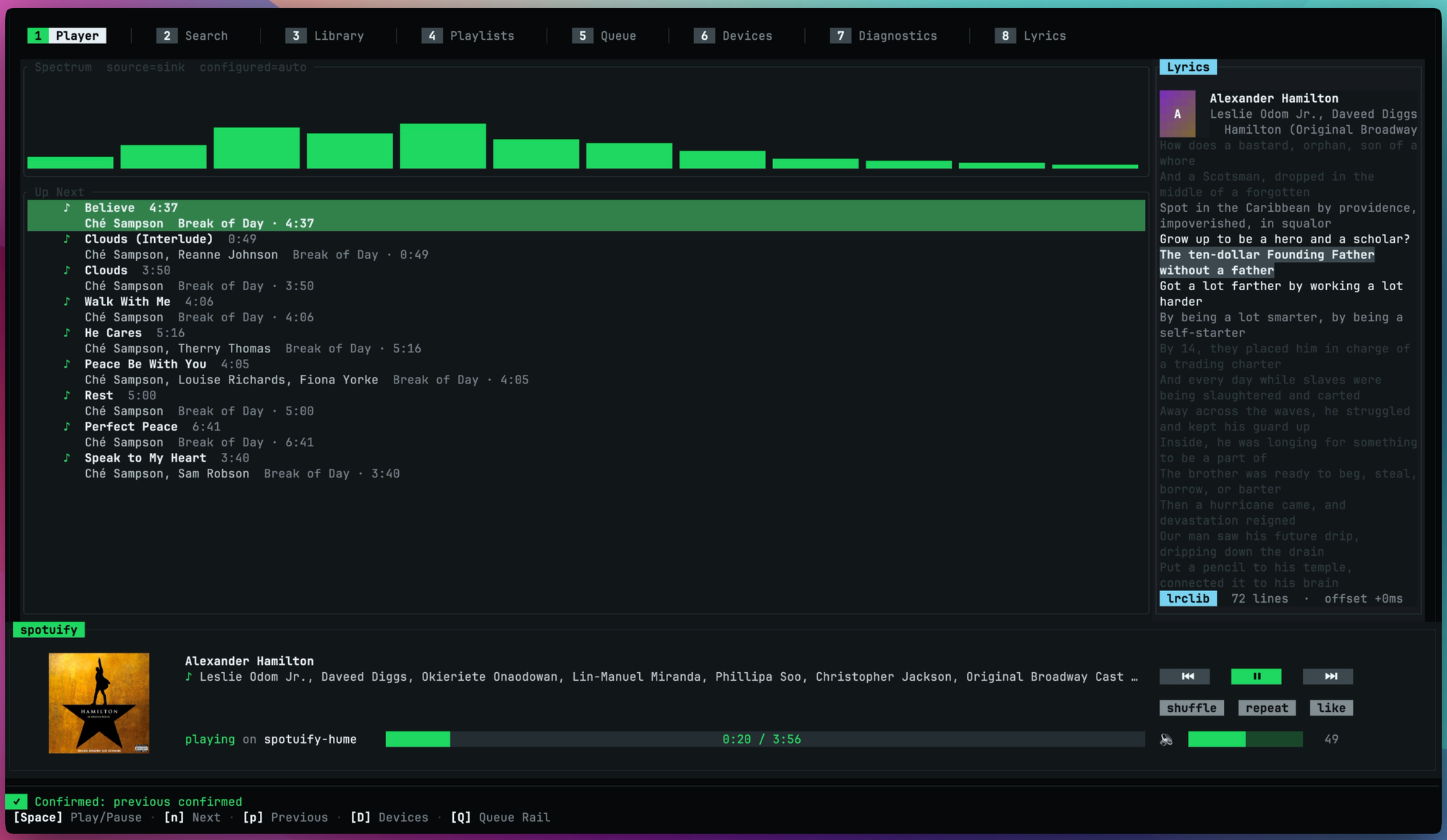
ncspot takes its visual cues from ncurses MPD clients. spotuify uses more screen space and more rendering work on the thing playing now. I prefer that, while someone who wants a sparse, information-dense list may not. The TUI reference shows the full layout.
So, why not just use ncspot?
Section titled “So, why not just use ncspot?”If I had wanted one good Spotify TUI, spotuify would be overbuilt. ncspot showed me how much of the hard player work should be done. I wanted a player I could leave running and approach through whichever interface fit the moment. The extra complexity pays off for me because I use those interfaces. It may not for you.