Why not just use spotify-player?
spotify-player is the closest existing alternative to what I wanted to build. It already has a Ratatui interface, embedded playback, synced lyrics, album art, an audio visualizer, a useful CLI, and an optional daemon mode.
If that were the whole product I wanted, I should have contributed there.
spotuify exists because I wanted the daemon to be the product. Once it owned playback and state, the TUI, CLI, MCP server, and menubar app could all use the same running system.
What I took from spotify-player
Section titled “What I took from spotify-player”I borrowed several concrete ideas:
spotify-player pattern |
What I carried into spotuify |
|---|---|
| Wrap the librespot audio sink to feed a spectrum analyser | spotuify uses the same sink-tap idea for its bouncing bars |
| Read synced lyrics through librespot and align them to playback time | The lyrics client follows the same retrieval and line-alignment approach |
| Send player events to a user-configured shell command | Shell hooks can forward qualified listens to Last.fm, ListenBrainz, or another script |
| Use Souvlaki for desktop media controls | spotuify uses it for OS play, pause, seek, and now-playing integration |
Accept one-off config overrides with -o key.path=value |
spotuify -o player.bitrate=160 ... changes one invocation without editing the config file |
| Ask for confirmation before destructive actions | spotuify carries that discipline into the TUI and MCP writes |
The Research Notes trace more of the implementation lineage. spotify-player solved several difficult problems before I reached them, and spotuify is better because I could study those solutions.
The overlap is real
Section titled “The overlap is real”Both applications are native terminal Spotify players. Both embed librespot, register as Spotify Connect devices, expose CLI commands, show synced lyrics, integrate with desktop media controls, and render live audio bars.
spotify-player can also run without its TUI. Build it with the optional daemon feature and its CLI talks to the running application over a local UDP socket. If no client is running, a CLI command can start one. That is already enough for many scripts.
spotify-player
TUI or optional daemonplayer + caches + UDP command socket                  ▲                  │                 CLI
Calling it “just a TUI” would be wrong.
Where spotify-player is better
Section titled “Where spotify-player is better”- It has been developed in public since 2021 and reached v0.24.1 in July 2026.
spotuifyis younger. - Its daemon is optional. You can install one application, open the TUI, and ignore the background architecture entirely.
- Its install options include Homebrew, Scoop, Cargo, Arch Linux, Void Linux, FreeBSD, NetBSD, NixOS, Docker, and release binaries.
- It offers a broad choice of librespot audio backends at build time.
- Its themes, layouts, keymaps, image rendering, pixelation, and feature flags give you more control over how the TUI is built and arranged.
- Its CLI already covers playback, search, Spotify data, likes, device connection, and playlist workflows including import and fork.
If you want one highly configurable Spotify TUI with a script-friendly CLI, use spotify-player. It may already be the more complete answer.
Where spotuify takes a different route
Section titled “Where spotuify takes a different route”In spotuify, the daemon owns the player and the state that every client reads:
spotuify
TUI · CLI · MCP · menubar           │           ▼        daemon           │           ├── embedded player           ├── SQLite library and history           ├── Tantivy search index           └── operation log
That choice pays off outside the TUI:
spotuify search "burial" --format ids | spotuify queue add --ids -spotuify status --format json | jq -r '.item.name'spotuify analytics rediscovery --gap 90dspotuify ops undo --dry-runspotuify mcpRead commands support table, JSON, JSONL, CSV, or IDs output. SQLite keeps the library and listening history as queryable data instead of collection-sized JSON cache files. Tantivy searches that local data. Playlist and library writes can be previewed, recorded, and undone where Spotify permits it. The MCP server gives agents another client without making the terminal screen their API.
This is also more machinery. spotuify has a database, a search index, a protocol, a long-running daemon, and four clients that must agree with one another. Those parts only earn their keep when you use them.
Which one looks better?
Section titled “Which one looks better?”I still prefer how spotuify looks. Its player screen gives album art, lyrics, the queue, controls, and the spectrum their own space.
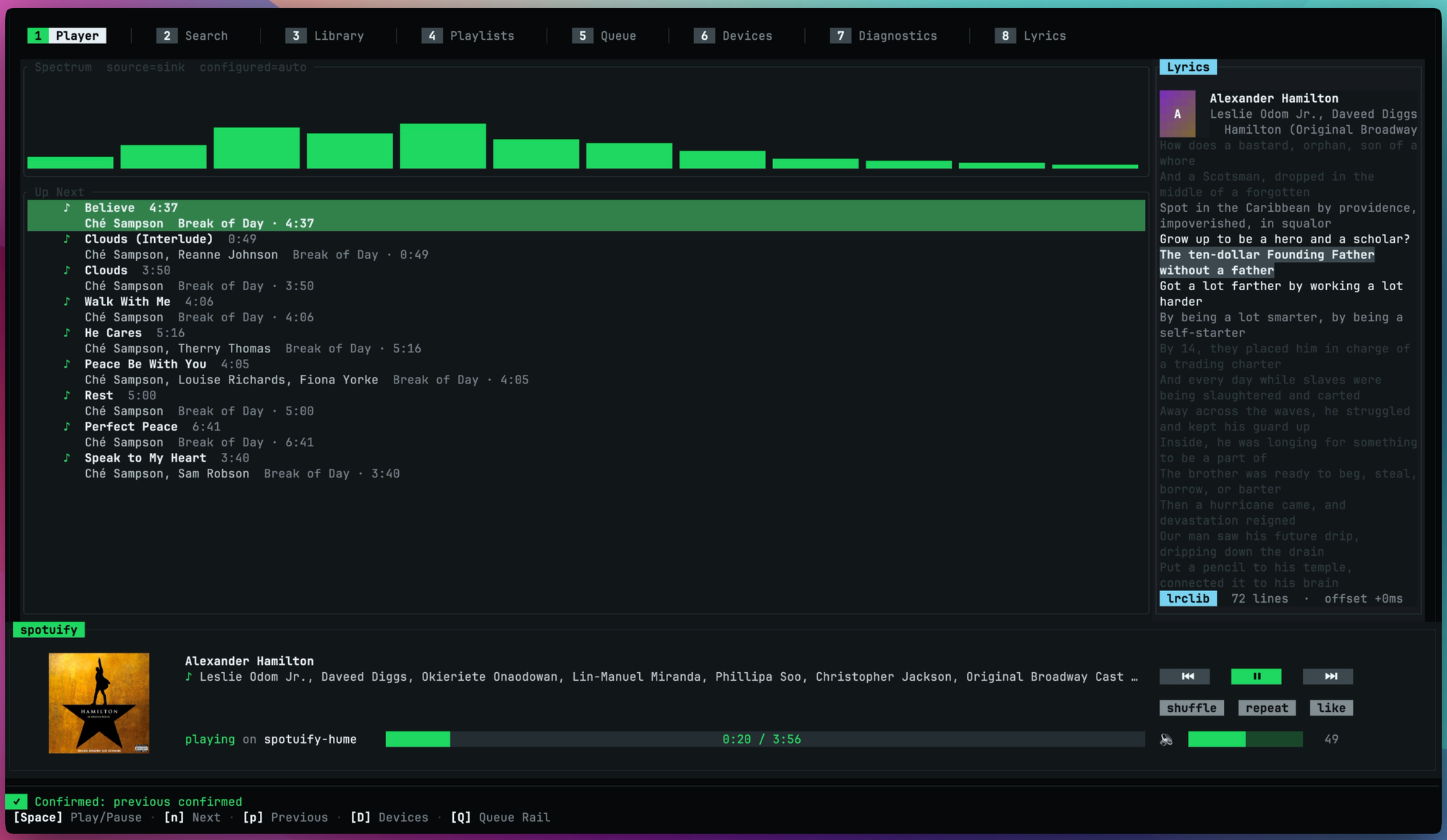
But the difference is taste, not feature availability. spotify-player also offers cover art, synced lyrics, themes, and an optional 64-band visualizer. If you prefer a denser Ratatui layout that you can reshape through config, it may look better to you.
So, why not just use spotify-player?
Section titled “So, why not just use spotify-player?”You probably should if you want a configurable terminal player and its CLI already covers your scripts. It did a lot of the hard work before spotuify arrived, and I learned from it directly.
I wanted a local music service I could leave running, query from disk, and use from an agent as easily as from the TUI. I also wanted writes I could inspect and undo. The extra architecture pays off for that use. It would be baggage for someone who only wants the TUI.